How One Mac Studio Replaced Our $1,000-a-Month Cloud Bill
Blueprints AI moved its automatic code testing (CI) from a pay-by-the-minute cloud service to one $5,499 Mac Studio. In the first measured week, jobs took about a quarter of the time GitHub's runners would need. At our past cloud bill of about $1,000 a month, the machine pays for itself in about six months. Footnoted, with the arithmetic and our tracker's screenshot.
on one Mac Studio
Blueprints AI
~9 min
JOBS ~4× FASTER THAN GITHUB'S RUNNERS
PAYBACK ≈ 6 MONTHS
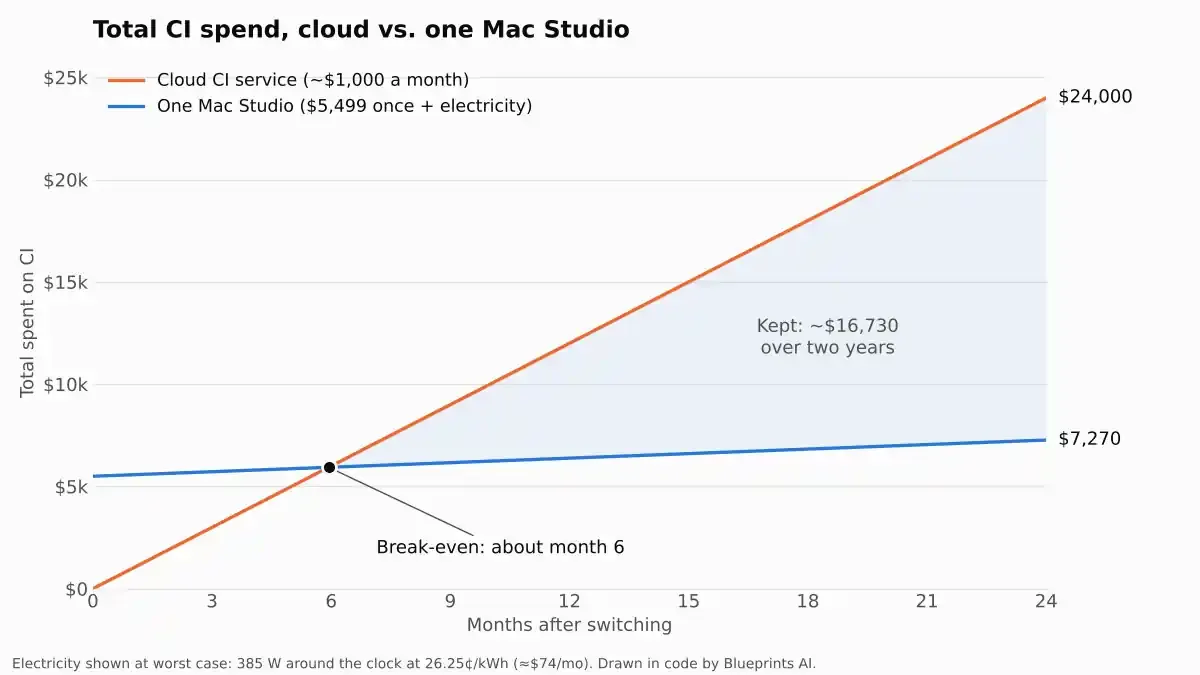
Blueprints AI builds software that turns architectural designs into construction drawings. Like every software company, it pays for CI: computers that automatically test every change an engineer makes. In November 2026 we moved that work from a cloud service that bills by the minute to one Mac Studio that cost $5,499. In the first week our tracker measured, jobs took about a quarter of the time GitHub's own runners would need, and about two-thirds of the time on Blacksmith, the cheaper service we had been paying.[1] Our cloud CI bill had been running about $1,000 a month; at that rate, even if the machine ran flat out around the clock, it pays for itself in about six months.[10] This note explains what CI is, why teams need it, what it costs, what we did, and when you should not copy us. Every outside figure is cited; where we estimate, we show the arithmetic.
1. What Is CI?
CI stands for continuous integration. In plain terms: every time an engineer sends in a change, a computer automatically downloads the latest code, builds it, and runs a long list of small tests to make sure nothing broke.[2] If a test fails, the engineer knows within minutes, not weeks later from an unhappy customer.
The computer that does this is called a runner. Most teams rent runners from a cloud company and pay for every minute the runner works.[3] A runner can also be your own computer. GitHub calls that a self-hosted runner, and that is what we switched to.
2. Why Every Software Team Needs It
I come from construction, so here is the comparison I use. CI is a building inspection that happens every day instead of once at the end. Small mistakes get caught while they are still cheap to fix.
It matters even more for us than for most teams. Our engineers work alongside AI coding tools that write and change code all day. More changes mean more checks, and with per-minute billing, more checks mean a bigger bill.
3. The Bill: Paying by the Minute
Here is what the minute costs today. We were on Blacksmith, which is already cheaper per minute than GitHub's own runners (Table 1). This is not a knock on them; it was the cheaper of the two options we had.
| Runner | GitHub-hosted[3] | Blacksmith[4] |
|---|---|---|
| Linux, 2 cores (x64) | $0.006 | $0.004 |
| Linux, 2 cores (ARM) | $0.005 | $0.0025 |
| Windows, 2 cores | $0.010 | $0.008 |
| macOS | $0.062 (3–4 cores) | $0.08 (6 cores, M4) |
| Your own computer (self-hosted) | $0 per minute to GitHub today. A $0.002 fee was announced, then postponed.[5] | n/a |
Fractions of a cent sound like nothing. They add up. About $1,000 a month buys roughly 250,000 minutes of Blacksmith's smallest Linux runner: around 4,167 runner-hours, or 5.7 runners working nonstop all month. The same number of minutes on GitHub's own 2-core runners would list at about $1,500.[10] Bigger runners cost more per minute, so real bills mix sizes; the point is the scale.
4. What We Did
We bought one Mac Studio with Apple's M5 Ultra chip: 30 CPU cores, 64 GPU cores, 96GB of memory and a 1TB drive, at a list price of $5,499.[6] We connected it to GitHub, where our code lives, and told GitHub to send our test jobs to the Mac instead of the cloud.
The engineers changed nothing about how they work. They send in code the same way as before. It just comes back faster. And the Mac does not sit idle between test runs: the team uses the same machine for everyday development and video editing.
5. The Numbers (Receipts Included)
| Measure | Cloud CI | One Mac Studio |
|---|---|---|
| Up-front cost | $0 | $5,499, once[6] |
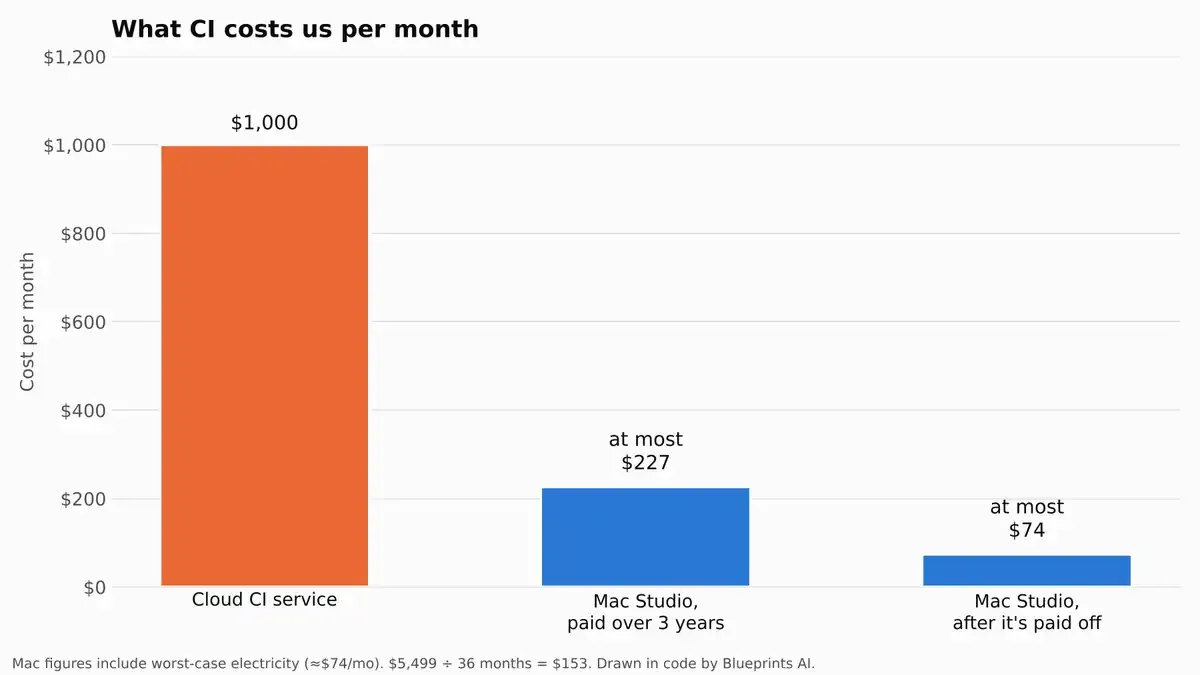
| Monthly cost | About $1,000[1] | Electricity: at most about $74[7][8] |
| Job time, first week | 59 h 45 m on Blacksmith; 156 h on GitHub (estimated) | 40 h 15 m[1] |
| Payback | n/a | About 6 months at our past cloud bill (5.5 to 5.9)[10] |
| Also used for | Nothing else | Development work and video editing |
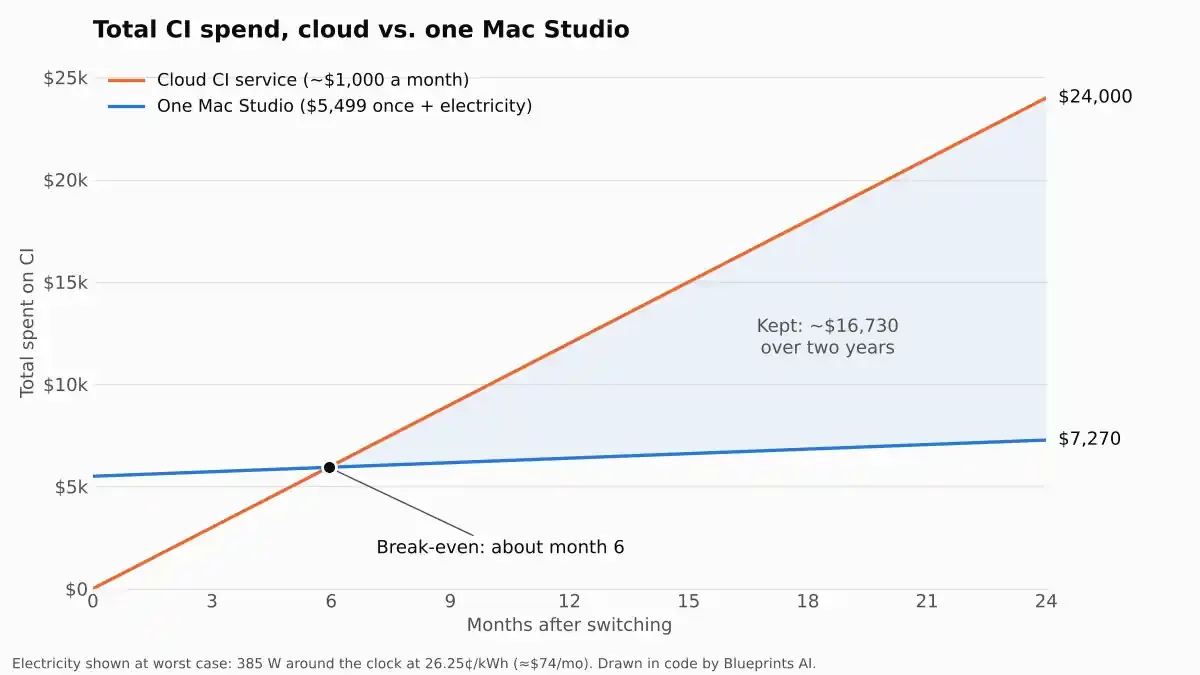
The electricity figure deserves a word, because it is the one number a skeptic will check. Apple publishes the maximum power draw of the top M5 Ultra Mac Studio: 385 watts, and 9 watts at idle.[7] If ours ran at that maximum every hour of every day, at California's average commercial electricity price, it would cost about $74 a month.[8] It never does, so the real number is lower. We use the worst case anyway.
| Measure | Worst case (max power, 24/7) | Best case (no electricity) |
|---|---|---|
| Break-even | 5.9 months | 5.5 months |
| Kept after year 1 | $5,616 | $6,501 |
| Kept after year 2 | $16,730 | $18,501 |
| Kept after year 3 | $27,845 | $30,501 |
We also built a small app that watches the Mac and keeps score (FIG. 3). It went live this week, during light testing, and it only counts the jobs the Mac has run since then. In that first week it measured 40 hours 15 minutes of job time on the Mac. It estimates the same jobs would have taken 59 hours 45 minutes on Blacksmith and 156 hours on GitHub's own runners: about two-thirds of Blacksmith's time, and about a quarter of GitHub's.[1][10] In money, that same week of jobs would have cost $28.68 on Blacksmith and $56.32 on GitHub.[1]
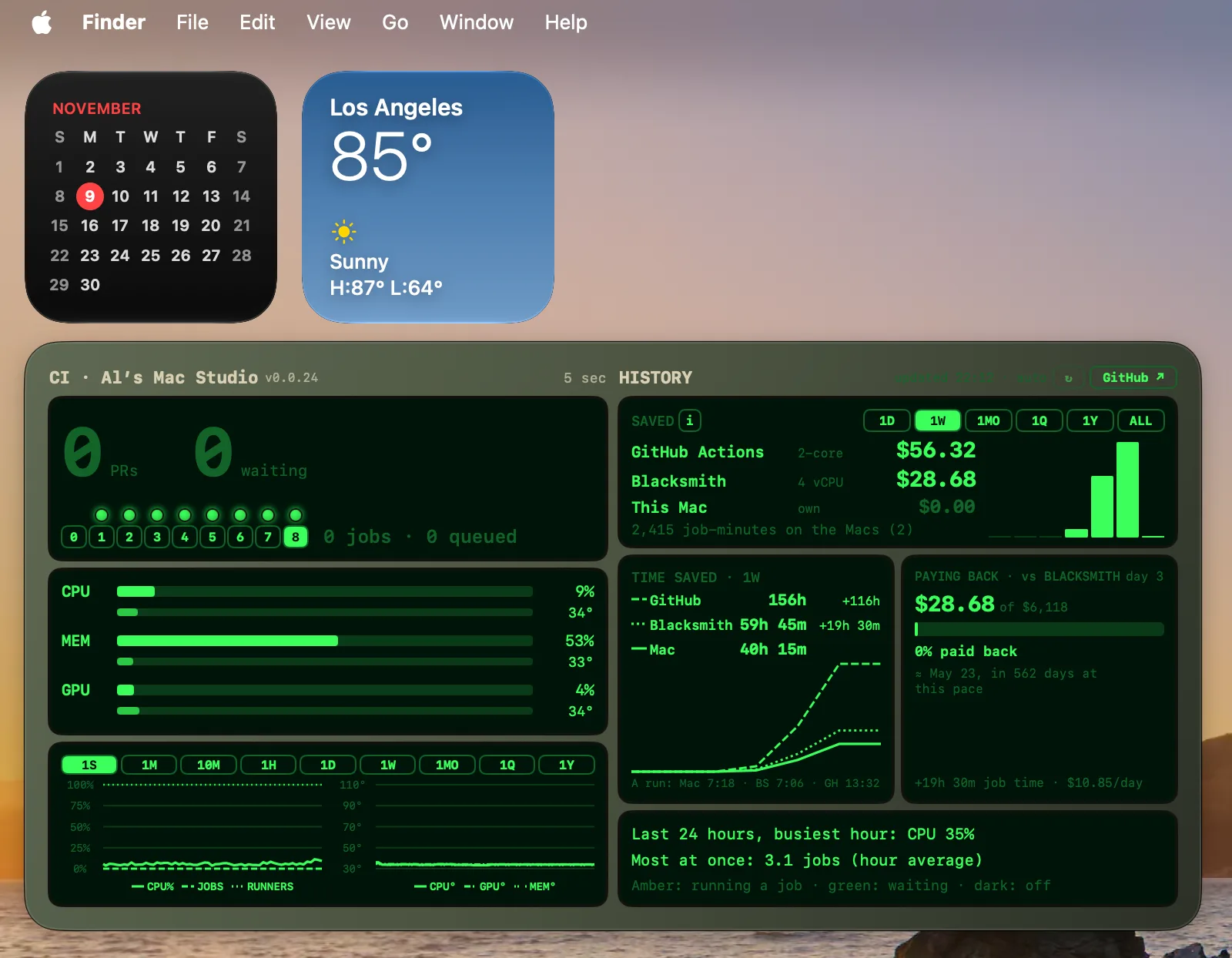
| Measure | Value |
|---|---|
| Job time on the Mac | 40 h 15 m |
| Same jobs on Blacksmith (estimated) | 59 h 45 m, costing $28.68 |
| Same jobs on GitHub's runners (estimated) | 156 h, costing $56.32 |
| Job-minutes run on our Macs | 2,415 |
| Runners on the Mac Studio | 8 |
| Busiest hour, last 24 hours | 35% of the processor; 3.1 jobs at once (hour average) |
What happens when it fills up?
We add another machine. Today the Mac has plenty of room: in its busiest hour of the last day it used 35% of its processor and ran about three jobs at once across its eight runners.[1] But the team is growing, so we're ordering a second, stronger Mac Studio: an M5 Ultra with a 36-core CPU, an 80-core GPU, 256GB of memory and 2TB of storage.[6] By the time we need the extra power, it will already be on the desk. Two machines also mean testing keeps running if one goes down.
6. Why One Computer Can Beat the Cloud
It sounds backwards. Cloud companies run huge fleets of fast machines. How does one box on a desk win? Three reasons, none of them magic.
No warm-up. A cloud runner usually starts empty for every job. It has to boot, download your code and all its tools, and only then start testing. Our Mac is always on and already has everything.
It remembers. Whatever the Mac downloaded for the last test run is still on its drive, so the next run skips that work.
It is fast, and it is ours. Apple's newest chips have very fast individual cores, and much of a test run is one long chain of steps that cannot be split up. Nobody else's jobs share the machine.
Cloud CI companies solve a harder problem: running thousands of strangers' jobs safely, in parallel, from a clean start every time. We do not have that problem: every job on our Mac is our own code.
7. When This Is Not a Good Idea
Open-source projects. If strangers can send code to your project, running it on your own computer is a security risk. GitHub recommends self-hosted runners only for private code.[9] Ours is private and written by our own team.
Big bursts of jobs. A cloud service can start dozens of runners at once. One computer can only do so many, so at busy moments jobs wait in line briefly. For us that is a fine trade, and when it stops being one, we add a machine (section 5).
Linux-only builds. If you build x86 Linux Docker images, an Apple chip has to imitate a different processor, which is slow. Keep those jobs in the cloud.
One machine, one point of failure. If the power or the internet goes out, testing stops. Keep your old cloud setup ready to switch back to, or run a second machine.
Prices change. GitHub's postponed $0.002-a-minute fee for self-hosted runners could return.[5] At 250,000 minutes a month, that would be about $500 a month: still half the old bill, but worth knowing.[10]
8. Conclusion: Check the Math
Blueprints AI builds software for the construction industry. Every dollar we save on infrastructure goes back into the product, and every minute our engineers do not spend waiting on tests is a minute spent building.
If your team works on private code and your CI bill keeps climbing, try it. Buy one machine, send a few test jobs to it, and compare. Worst case, you end up with a very good computer.
For engineers: the setup
We installed GitHub's runner app on the Mac, registered it with our organization, and run several runner instances on the one machine so jobs can run in parallel. Then one line changes in each workflow file:
jobs:
  test:
runs-on: [self-hosted, macOS, ARM64]References & Calculations
Sources consulted November 9, 2026. Prices carry their as-of dates and will drift; the arithmetic will not. Charts marked "drawn in code" were plotted in Python from the figures below.
- Blueprints AI internal figures. Cloud CI spend of about $1,000 a month before the switch. Our CI tracker (FIG. 3), screenshot taken November 9, 2026, day 3 of tracking: 8 runners on the Mac Studio; 2,415 job-minutes run on our Macs; job time for the week of 40 h 15 m on the Mac, against an estimated 59 h 45 m on Blacksmith (4-vCPU runners) and 156 h on GitHub-hosted 2-core runners; the same jobs priced at $28.68 on Blacksmith and $56.32 on GitHub; payback progress of $28.68 of $6,118 at $10.85 a day; busiest hour in the last 24 hours at 35% CPU and 3.1 jobs at once. The cloud times and costs are the tracker's estimates for the same jobs, not separate runs. Figures reflect our own codebase and workload; yours will differ. ↩ a b c d e f g
- What CI is. GitHub Docs, Continuous integration: committing code often and building and testing it automatically on every commit, so errors are caught sooner. Building and testing requires a server, either your own machine or a CI server. ↩
- GitHub-hosted runner prices. GitHub Docs, Actions runner pricing, read November 9, 2026: Linux 2-core x64 $0.006, Linux 2-core ARM $0.005, Windows 2-core $0.010, macOS 3- or 4-core $0.062 per minute. GitHub rounds each job up to the next whole minute. ↩ a b
- Blacksmith runner prices. Blacksmith docs, pricing Removed by the publisher ($0.004 per minute for a 2-vCPU Ubuntu x64 runner, billed per minute), and the full rate list as read by cicdpipelinecost.com on October 1, 2026: Ubuntu ARM $0.0025, Windows x64 $0.008, 6-vCPU macOS M4 $0.08, with 3,000 free minutes a month. ↩
- GitHub's self-hosted runner fee. On December 16, 2025, GitHub announced hosted-runner price cuts of up to 39% from January 1, 2026, and a $0.002-per-minute charge on self-hosted runners from March 1, 2026. Within days it posted an update: it was "postponing the announced billing change for self-hosted GitHub Actions" (GitHub changelog; see also Techzine). GitHub's pricing page, read November 9, 2026, lists no charge for self-hosted runners [3]. ↩ a b
- Mac Studio, M5 Ultra. Starting configuration: 30-core CPU, 64-core GPU, 96GB unified memory, 1TB SSD, $5,499 in the US (PetaPixel; 9to5Mac; Apple, tech specs). Before sales tax. The stronger configuration we are ordering has a 36-core CPU and 80-core GPU (PetaPixel) and can be configured with 256GB or 512GB of memory (Apple, tech specs). ↩ a b c
- Power use. Apple, Mac Studio power consumption and thermal output: the M5 Ultra with 36-core CPU, 80-core GPU, 512GB memory and 16TB SSD draws 9 W idle and 385 W at maximum, measured at the wall. Apple lists only that configuration for the M5 Ultra; we use its maximum as an upper bound for our smaller one. ↩ a b
- Electricity price. California's average commercial electricity price for the 12 months ended January 2026 was 26.25 cents per kWh, based on US Energy Information Administration data (Center for Jobs and the Economy). Your utility's rate may differ. ↩ a b
- Security. GitHub Docs, Managing access to self-hosted runners: GitHub recommends using self-hosted runners only with private repositories, and by default only private repositories can use them. ↩
- Calculations. Worst-case electricity: 385 W × 730 hours = 281.05 kWh a month × $0.2625 = $73.78. Break-even: $5,499 ÷ ($1,000 − $73.78) = 5.94 months; with no electricity, $5,499 ÷ $1,000 = 5.50. Kept after N months = $1,000 × N − $5,499 − $73.78 × N (worst case) or $1,000 × N − $5,499 (best case): 12 months $5,616 / $6,501; 24 months $16,730 / $18,501; 36 months $27,845 / $30,501. FIG. 1 totals at 24 months: cloud $24,000, Mac $5,499 + $1,771 = $7,270. FIG. 2: $5,499 ÷ 36 = $152.75, plus $73.78 = $226.53. Minutes: $1,000 ÷ $0.004 = 250,000 runner-minutes = 4,167 runner-hours; ÷ 730 hours = 5.7 runners nonstop; 250,000 × $0.006 = $1,500 at GitHub's 2-core Linux rate. A returning $0.002 fee: 250,000 × $0.002 = $500. Runner-minutes are an equivalent at the smallest runner's rate, not a measured count; faster machines use fewer minutes for the same work. Speed, from the tracker [1]: 40.25 h ÷ 156 h = 26% of GitHub's time (3.9× faster); 40.25 h ÷ 59.75 h = 67% of Blacksmith's time (1.5× faster). The tracker's early pace: $10.85 a day × 30 = about $326 a month against Blacksmith, and ($6,118 − $28.68) ÷ $10.85 ≈ 561 days, which the tracker shows as 562. Our past bill of about $1,000 a month is about $33 a day. ↩ a b c d e f g